- Open The Hours MOS above, in Safari.
- Tap the Share button — the small square with an arrow coming out of the top, at the bottom middle of the screen.
- Tap View More, so the whole list opens.
- Tap Add to Home Screen, then Add.
- Open The Hours MOS above, in Chrome.
- Tap the three dots in the top right corner.
- Scroll down to Install, and tap it.
It then opens full screen, like anything else on your phone. Nothing to download, nothing to update, and no store in the middle taking a cut.
What it is
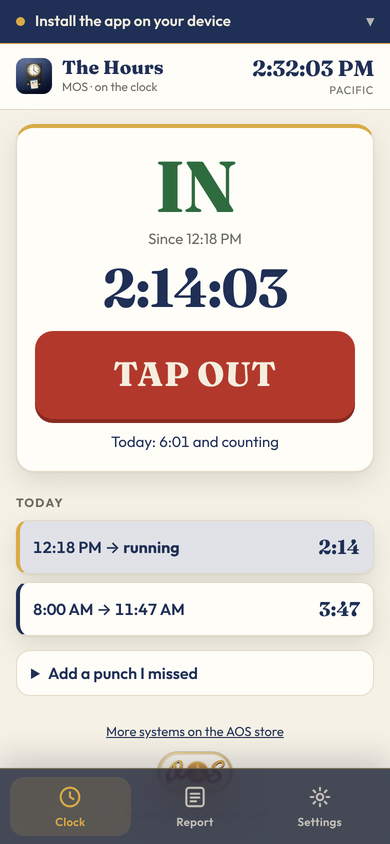
A punch clock for one person. Tap the big button when you start and it says IN in green and counts; tap it again when you stop and it says OUT. The time at the top is the real time — Pacific unless you pick another zone in Settings — so there is nothing to write down and nothing to remember.
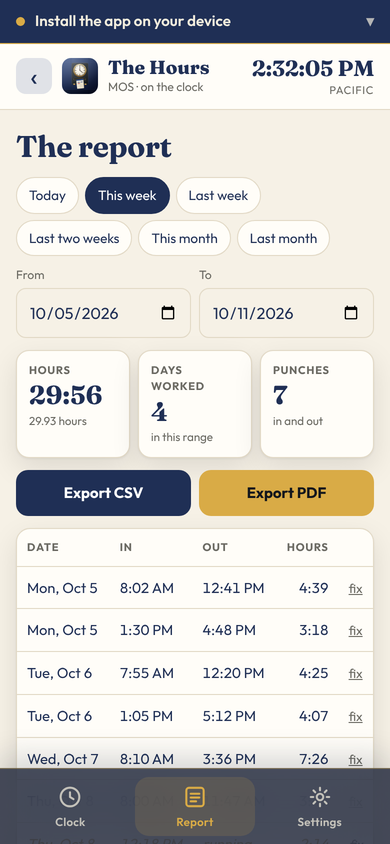
The Report screen lists every punch by date: time in, time out, and the hours between, for today, this week, last week, the last two weeks, this month, last month, or any two dates you choose. It adds them up, counts the days worked, and prints the lot as a CSV for a spreadsheet or a PDF to send. Forgot to tap? Add a punch I missed takes the in and out by hand, and any row can be fixed later.
Your punches live on the server under your own eight-character clock card, not in the phone. Clear the browser, get a new phone, type the card number into Settings, and every punch is still there. No signal? It keeps the punch and catches up when the signal is back. Light by day and dark at night, or pick the look you like.
The Hours MOS runs in your browser. There is nothing to download and no account — the link above opens the real software, not a preview or a video of it.
Pricing
The facts
More money & fine print
Everything else we make
Accelerated Experiences LLC builds business operating system software for specific trades — dental practices, home care agencies, field service, real estate, engineering, photography — as well as this family of apps. Browse the whole shop.